How to Stop Re-Planning Every Day and Actually Start

Keep rewriting your plan every morning and still not starting? This guide shows how to lock one daily execution path and end the reset loop.
Table of Contents
How to stop re-planning every day is not really a calendar question.
It is a trust question.
You made a plan yesterday. Something slipped. Now this morning's version already feels wrong, so you open the notes app, move blocks around, rewrite the task list, and promise yourself this new version is the one you will finally follow.
Then noon arrives and the hard task is still untouched.
If that pattern feels familiar, the problem is usually not that you need a smarter template. The problem is that your planning loop has become a way to delay contact with the real work. This guide shows you how to stop re-planning every day, lock one believable execution path, and recover without starting from zero.
What does re-planning every day actually mean?
Re-planning every day means rebuilding your task order from scratch so often that planning becomes the main activity and execution becomes optional. It usually starts after missed work, rising uncertainty, or low trust in yesterday's priorities.
That definition matters because normal plan adjustments are fine.
If your calendar changes, you should adapt. If a dependency breaks, you should adapt. If your capacity gets cut in half, you should absolutely adapt.
The problem starts when adaptation turns into a ritual.
You are no longer asking, "What changed?" You are asking, "Can I make a fresh enough plan that I do not have to feel yesterday's miss?"
That is a very different job.
Why people get stuck in the daily reset loop
Daily re-planning usually comes from one of four failure modes.
1. Yesterday's tasks were never truly startable
Lots of plans look specific until you try to begin them.
- work on presentation
- make progress on course
- fix landing page
Those are not executable tasks. They are containers.
When a task is still fuzzy at the moment of contact, your brain looks for relief. Re-planning gives that relief fast. It lets you feel productive without forcing clarity.
2. One missed block destroys your trust in the whole day
This is common with people who plan tightly.
You miss the 7:30 PM study block. Now the entire schedule feels contaminated. So instead of salvaging one session, you rebuild the whole day.
I have done this myself. It feels rational for about ten minutes. Then you realize you spent your small evening energy budget on rearranging the board instead of doing the thing the board was for.
3. The plan keeps pretending your capacity is higher than it is
If you work full-time, commute, deal with family obligations, or just hit the wall after 6 PM, an optimistic plan becomes a daily trust breach.
Once that happens a few times, the morning rewrite starts to feel necessary.
But the real issue is not the rewrite. It is the repeated mismatch between the plan and your actual life.
This is one reason posts like Study After Work When You're Mentally Exhausted and How to Stay Consistent With an Unpredictable Schedule keep landing with people. Capacity lies create planning churn.
4. Re-planning lets you avoid the emotionally loaded task
This is the uncomfortable one.
Sometimes the plan is good enough. The issue is that one task has enough uncertainty, boredom, or ego risk attached to it that you would rather redesign the day than touch it.
That is why daily re-planning often clusters around:
- writing
- studying weak material
- outbound sales
- shipping unfinished work
- hard project decisions
The loop is not random. It protects you from discomfort while calling itself optimization.
Re-planning vs real adjustment
This distinction clears up a lot.
| Pattern | What it looks like | What it does |
|---|---|---|
| Real adjustment | Resize one task after a schedule change | Protects execution |
| Real adjustment | Move work because a dependency broke | Preserves the critical path |
| Re-planning loop | Rewrite the whole list every morning | Burns energy before work starts |
| Re-planning loop | Keep changing order without changing task clarity | Creates motion without progress |
| Re-planning loop | Start over after one miss | Turns one slip into a lost day |
If you keep changing the plan but the first hard move stays vague, nothing meaningful changed.
How to stop re-planning every day in 5 steps
You do not need a grand new system. You need a narrower protocol.
1. Keep the day to one protected path
Your plan for today should have one path that matters if everything else gets messy.
Not three priorities. Not a fully balanced life stack. One path.
Examples:
- finish the first draft of the client proposal
- complete one practice set and review mistakes
- ship the signup form bug fix
Everything else can exist as optional support work. But the day needs one protected line you can point to and say, "If this moves, the day counts."
Without that, every task starts competing as soon as stress shows up.
2. Convert the first task into a sub-10-minute start
This is the part people skip because it feels too small.
Do it anyway.
Your first task should be something you can begin in under ten minutes without needing a planning meeting with yourself.
Bad:
- work on article
Better:
- open the draft and write the headline plus first paragraph
Bad:
- study networking
Better:
- answer 12 subnetting questions and mark the mistakes
The brain trusts what it can start. It does not trust noble intentions.
3. Add a salvage rule before the day breaks
Most people only decide how to react after a miss. That is too late.
Make the rule in advance:
- if I miss the evening block, I still do the floor version
- if the task feels too big, I cut scope instead of rewriting the day
- if one task slips, I do not touch the whole plan until the next review window
This is the difference between a resilient system and a dramatic one.
When you define salvage logic early, one broken block stops being a referendum on the whole plan.
4. Limit planning to one review window
If you are trying to stop re-planning every day, do not give yourself unlimited access to the blueprint.
Pick one short planning window for the day. For most people, 10 to 15 minutes is enough.
After that, the plan is closed unless one of these is true:
- a real external constraint changed
- the task was impossible to start as written
- an upstream dependency failed
Anything else is usually just planning temptation.
This rule sounds rigid. It is supposed to. If you are trapped in a reset loop, more flexibility is often the bug.
5. Track plan trust, not planning effort
Do not reward yourself for making a better-looking plan. Reward the system for surviving contact with reality.
At the end of the day, ask:
- Did I move the protected path?
- Was the first task easy to start?
- Did I salvage the day without rewriting everything?
- What made me want to reset the plan?
That last question matters.
Sometimes the answer is bad capacity math. Sometimes it is poor task design. Sometimes it is plain avoidance.
You need the real diagnosis, not a prettier planner.
What to do when you already broke the plan this week
If the week is already messy, do not use this article as an excuse to build another recovery architecture.
Use this shorter sequence:
- Pick the one outcome that is still alive this week.
- Delete or defer the tasks that no longer protect it.
- Define the next session as one closed move.
- Shrink that move until you can start it tonight.
- Do not redesign the rest of the week until the next scheduled review.
That is it.
If you keep missing weeks and then doing dramatic resets, read How to Restart After Burnout Without Starting Over. If the issue is broader overthinking, Why You're Stuck in Strategy Procrastination covers the pattern from a wider angle.
A simple script for the next 24 hours
If you want something concrete, use this exact script once.
Tonight
- choose tomorrow's protected path
- write the first sub-10-minute start
- define the floor version if the day breaks
Tomorrow morning
- look at the plan once
- do not reorder anything for 90 minutes
- start the first move before checking lower-value admin
If you miss a block
- run the floor version
- do not rebuild the full day
- log why the miss happened for the next review window
This works because it removes the fake choice architecture that fuels re-planning.
You are not waking up and asking, "What is the perfect order for today?" You are waking up and asking, "Can I move the one path I already chose?"
That question is much harder to dodge.
Where Kognivu fits
This is exactly where Kognivu should help.
The useful part is not just generating a plan. Plenty of tools can do that. The useful part is protecting the chain between the goal, the current milestone, and today's next step so you do not have to renegotiate the whole system every morning.
Kognivu starts with the goal, deadline, and real time budget. From there, the AI Architect maps the work into modules, milestones, and daily quests. That structure makes daily adjustment smaller and cleaner because the task already belongs to a larger path.
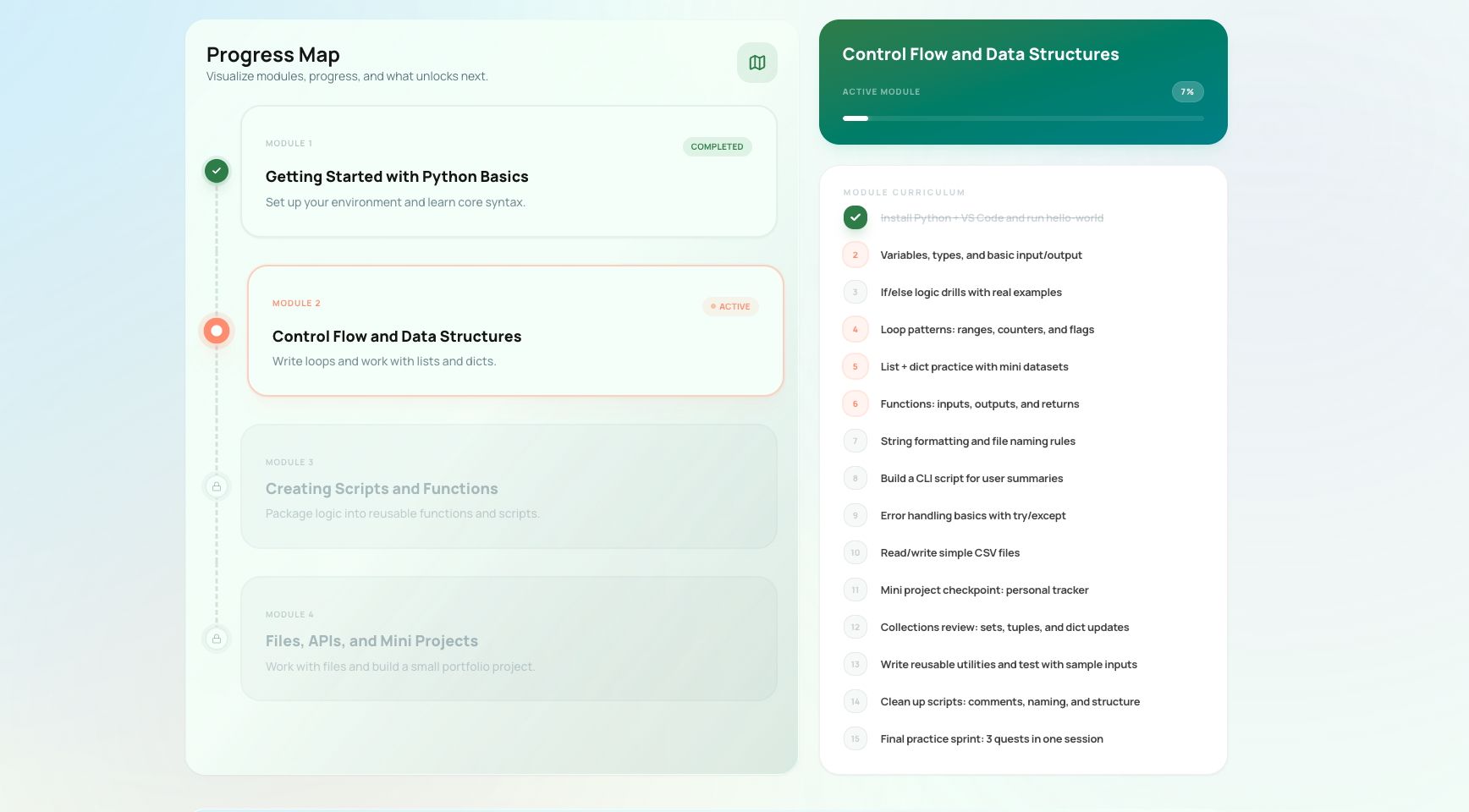
Kognivu's roadmap view gives you a stable execution path, so one missed block does not force a total rewrite.
The point is not rigid perfection. The point is fewer daily negotiations.
If your system keeps making you ask "what should I do now?" from scratch, it is not reducing cognitive load. It is just storing your anxiety in a nicer format.
FAQ: how to stop re-planning every day
Is re-planning every day always bad?
No. Daily adjustment is normal when your reality changes. It becomes a problem when you rebuild the plan so often that planning replaces the work itself.
Why does re-planning feel productive?
Because it creates short-term relief. You get a sense of control without facing the hardest task. That emotional payoff is real, which is why the habit sticks.
How long should daily planning take?
Usually 10 to 15 minutes is enough if the bigger roadmap already exists. If you are spending much longer every day, the tasks are often too vague or the weekly structure is too fragile.
What if the original plan really was bad?
Then fix it during a defined review window and make the next task more startable. The answer is still not to reopen the whole system every time resistance shows up.
Ready to Stop Resetting the Day?
Kognivu helps you turn one real goal into a stable execution path with milestones, daily quests, and recovery logic when life breaks the schedule.
Build your execution plan and start immediately. Plus and Pro include a 3-day trial.
Written by
Ilia Sorokin
Expert in Productivity Systems and deterministic planning systems. Building tools to bridge the gap between ambitious goals and daily execution.
Kognivu editorial team
Next step
Need product path, not just theory?
If goal tracking apps keep showing data without changing behavior, Kognivu offers a more active execution-first alternative.
Explore Alternative to Passive Goal Tracking AppsContinue Reading
More from Productivity Systems